vSeeBox Comparison: V6 Pro vs. V6 Max vs. V6 Plus
Choosing the right streaming device doesn’t have to be complicated. The vSeeBox V6 Pro (2026), V6 Max (2025), and V6 Plus (2025) all provide a powerful Android-based entertainment experience, but there are some important differences between the three models.
Whether you’re setting up entertainment at home, in your RV, on the boat, or while traveling, this comparison will help you understand the differences and choose the model that best fits how you plan to use it.
Same Great Entertainment. Different Features.
All three vSeeBox models run Android 14.0 OS and include voice-control capability. They also provide access to popular vSeeBox entertainment applications, including:
Heat Live with Multiview
Heat VOD
VOD Ultra
Backup TV
Where the models begin to differ is in storage, remote features, and access to Live Ultra and Live Ultra+.
🟠 vSeeBox V6 Pro (2026)
The V6 Pro is a straightforward option for customers who want the core vSeeBox entertainment experience without paying for features they may not need.
V6 Pro Highlights
Android 14.0 OS
4GB RAM
32GB Internal Storage
Heat Live with Multiview
Heat VOD
VOD Ultra
Backup TV
Voice Remote
The V6 Pro remote is not backlit, and this model does not include Live Ultra or Live Ultra+ Split Screen.
Who is the V6 Pro for?
The V6 Pro makes sense for customers primarily interested in the essential streaming features and who don't require the additional storage or Live Ultra features available on the other models.
🔵 vSeeBox V6 Max (2025)
The V6 Max steps things up with additional internal storage and a backlit remote.
It features 4GB RAM and 64GB of internal storage, giving you twice the internal storage of the V6 Pro.
V6 Max Highlights
Android 14.0 OS
4GB RAM
64GB Internal Storage
Heat Live with Multiview
Heat VOD
VOD Ultra
Backup TV
Backlit Remote
Voice Control
The V6 Max does not include Live Ultra or Live Ultra+ Split Screen.
Who is the V6 Max for?
Consider the V6 Max if you want more internal storage and the convenience of a backlit remote, while keeping the familiar core vSeeBox entertainment features.
🔷 vSeeBox V6 Plus (2025)
The V6 Plus stands apart because it combines 64GB of internal storage with the additional Live Ultra and Live Ultra+ Split Screen features.
V6 Plus Highlights
Android 14.0 OS
4GB RAM
64GB Internal Storage
Heat Live with Multiview
Heat VOD
VOD Ultra
Backup TV
Live Ultra
Live Ultra+ Split Screen
Backlit Remote
Voice Control
Live Ultra+ Split Screen
One of the biggest differences with the V6 Plus is Live Ultra+ Split Screen.
This feature is designed for viewers who want the ability to watch multiple live feeds on one screen. That can be especially useful during busy sports weekends when several games or events are happening at the same time.
Instead of constantly switching back and forth, Split Screen gives you another way to keep up with the action.
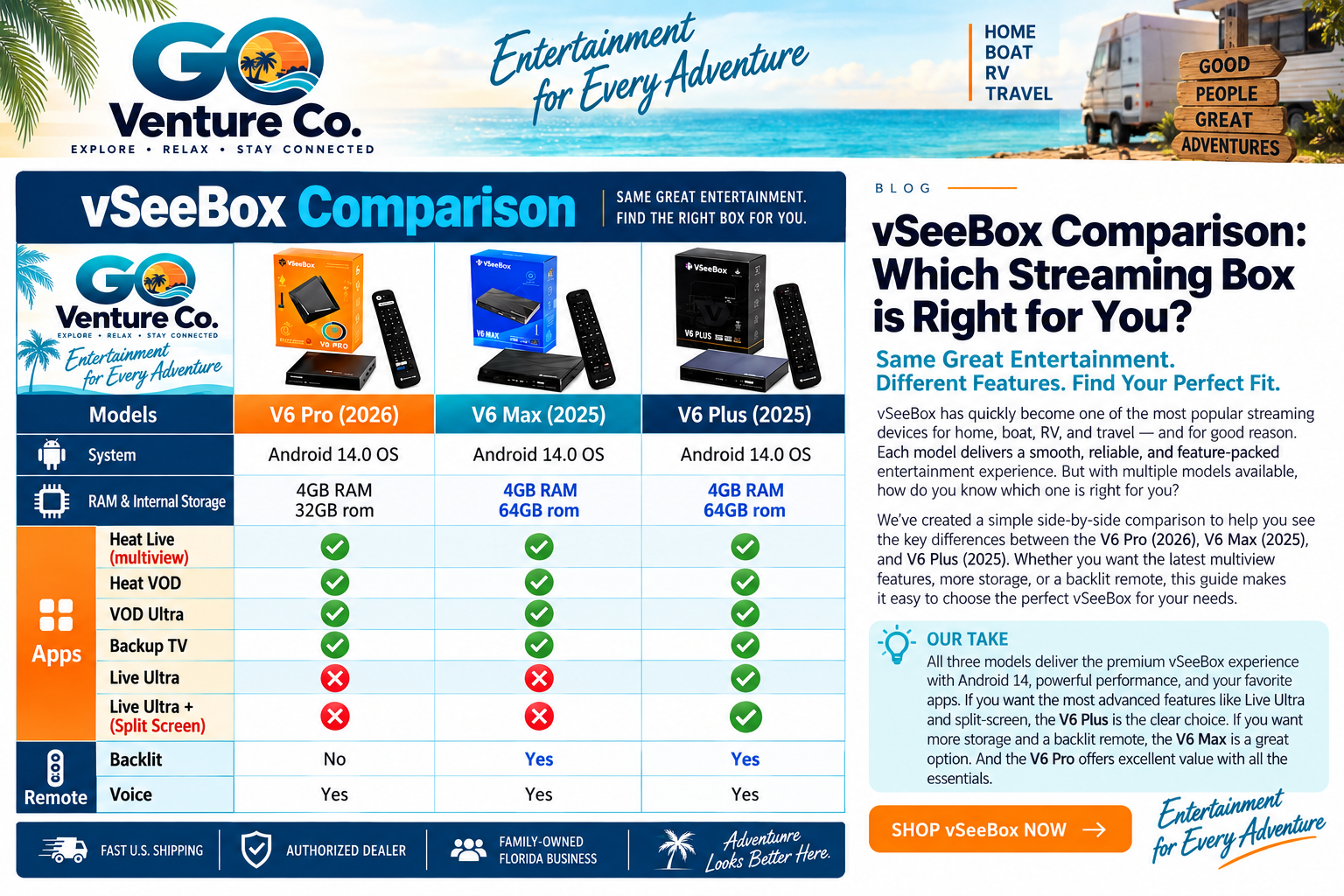
Which vSeeBox Should You Choose?
The biggest differences come down to what features matter most to you.
V6 Pro: A simpler choice with the core features, 32GB of storage, and voice control.
V6 Max: Adds 64GB of storage and a backlit remote, making it a nice step up from the V6 Pro.
V6 Plus: Adds Live Ultra and Live Ultra+ Split Screen along with 64GB of storage, a backlit remote, and voice control.
For customers who watch a lot of live programming—especially sports—the additional Live Ultra features on the V6 Plus may be particularly useful.
Entertainment for Home, Boat, RV & Travel
A streaming box doesn't have to stay in your living room.
The compact size of vSeeBox devices makes them convenient for different entertainment setups. Connect your device to a compatible TV or display and a suitable internet connection, and you can take your familiar entertainment setup along on your adventures.
That makes vSeeBox a convenient option for:
Home • RV • Boat • Vacation Home • Travel
At GO Venture Co., that's exactly what we're about: technology and products that help you Explore • Relax • Stay Connected.
Shop vSeeBox at GO Venture Co.
Not sure which model fits your setup? Contact us before ordering. We can explain the differences between the V6 Pro, V6 Max, and V6 Plus and help you understand which features match what you're looking for.
GO Venture Co.
Family-Owned Florida Business
Authorized Dealer
Fast U.S. Shipping